How to Make a Software/ Make your own software. Make applications for windows.
How ever it is necessary to learn a programming language to make a software. But there are some tools which can make easy to build you a software.
Some of those are opensource while other are paid. One of the open source software to build a software is eclipse indigo. Using eclipse you can make software in c++, c, java and some other languages also. Eclipse is a multi-language software development environment comprising a base work space and an extensible plug-ins system for customizing the environment. It is written mostly in java.
The Eclipse Platform uses plug-ins to provide all functionality within and on top of the run time system, in contrast to some other applications, in which functionality is hard cord. The Eclipse Platform's run-time system is based on equinox, an implementation of the OSGi core framework specification.
 The Eclipse Web Tools Platform (WTP) project is an extension of the Eclipse platform with tools for developing Web and Java EE applications. It includes source and graphical editors for a variety of languages, wizards and built-in applications to simplify development, and tools and APIs to support deploying, running, and testing apps.
 using eclipse you can make software, for windows and mac. For this purpose you will have to download eclipse in different versions available in the link given below according to your choice. http://www.eclipse.org/downloads/ So download it install and enjoy making software and apps of you own.....
Some of those are opensource while other are paid. One of the open source software to build a software is eclipse indigo. Using eclipse you can make software in c++, c, java and some other languages also. Eclipse is a multi-language software development environment comprising a base work space and an extensible plug-ins system for customizing the environment. It is written mostly in java.
The Eclipse Platform uses plug-ins to provide all functionality within and on top of the run time system, in contrast to some other applications, in which functionality is hard cord. The Eclipse Platform's run-time system is based on equinox, an implementation of the OSGi core framework specification.

 using eclipse you can make software, for windows and mac. For this purpose you will have to download eclipse in different versions available in the link given below according to your choice. http://www.eclipse.org/downloads/ So download it install and enjoy making software and apps of you own.....
Different Generations of Computer/ Phases of computer development.
Computer developed
in different phases there are different generations with the passage of time,
when we categorize them we come to know that there are five different generations
of computer. These are phases of computer development. Here we discuss these in
detail.
First
generation of computer:
1 Use of vacuum tubes.
2 Big and clumsy.
3 High electricity consumption.
4 Programming in mechanical language.
5 Larger AC were used.
6 Lot of electricity failure occurred.

Second
Generation of Computer:
Transistors were used.
Core memory was developed.
Faster then first generation
computer.
First operating System was developed.
Programming was in Machine language and
Assembly language.
Magnetic tapes and discs were used.

Third
generation of Computer:
1 Integrated circuits were developed.
2 Power consumption was low.
3 SSI and MSI technology was used.
4 High level languages were used.

Fourth
Generation of Computer:
1 LSI and VLSI technology used.
2 Development of Portable Computer.
4 Computer was used in data
communication.

Fifth
Generation of Computer:
1 Used in parallel processing.
2 Used super Conductors.
3 Used in speech recognition.

4 Used in intelligent Robots.
5 Used in artificial intelligence.
Make disk Partitions on your Pc.
Disk
partition is necessity, but it is how ever not such a difficult job to do. It Is
possible by following such few steps. It can be performed without any software.
Disk partition is a window function so it can be directly performed from
control panel. To make, partition just follow the few steps given below.
1) If you are using windows 8 right click on START. (in windows xp go to all programs
and click on CONTROL PANEL )
2) Click on CONTROL PANEL.
3) Now click on System and Security.
4) Go to Administrative tools and click
on create and format hard disk
partitions.

5) Now the Disk Management box will open. You can shrink, extend, Format
volume and create new volumes by right clicking on any drive.
Best Audio, Video, Cutter/Converter, Image converter, Video player, Audio, Video joiner, slide show, for free.
Many Best Audio, Video, Cutter/Converter, Image converter, Video player Audio, Video joiner, slide show are available but there are few having all these functions at the same time. One of the best Audio, Video, Cutter/Converter, Image converter, Video player for free is Media cope. It is totally free and easy to install and use. It has all the functions at the same time, with high processing speed and good performance. It can play all kinds of video formats such a flv, mkv, mp 4, HD, 3GP, WMV, MOV, AVI, etc...
 Media cope is available in different versions.
 It can save a lot of time when you need to crop a lot of photographs. Photo Resizer can resize and convert your photographs with special methods.


It is so easy and light software that you can even you can install it on Pentium series.
It can save a lot of time when you need to crop a lot of photographs.
It is really amazing to use.
Internet Tools contains Speak Text, Web Image Full Screen Viewer, both are amazing tools.
You can try it by downloading clicking on following link..
Click on download button and enjoy it..
Make a Website/ Tools For Making Website.
Making a website is not so difficult as so many people think. It can be made possible by just few tricks. You can Build your own Website with a little effort using simple tools. It can make you more easy if you have little know-how about programming languages like HTML, PHP, JAVA SCRIPT. But if you aren't aware of any of these language you can also than build a website of yourself. Because of some software don't have concern with these languages. I mean that you will have no need to type code by yourself. Here are those software/tools.
1) Adobe Dreamweaver.
Dreamweaver is not a opensource tool, it is paid. Adobe Dreamweaver can be downloaded by following link. https://creative.adobe.com/apps?trial=DRWV&promoid=JZXTK&locale=en
 This can be downloaded and installed. Videos tutorials are also available for Adobe Dreamweaver. It is easy to learn.
2) Net Beans.
There is another software available for web development it is totally free/Open source. For developing a site in Net Beans you will also need Wampserver.

1) Adobe Dreamweaver.
Dreamweaver is not a opensource tool, it is paid. Adobe Dreamweaver can be downloaded by following link. https://creative.adobe.com/apps?trial=DRWV&promoid=JZXTK&locale=en

2) Net Beans.
There is another software available for web development it is totally free/Open source. For developing a site in Net Beans you will also need Wampserver.

You can download it by the following link..https://netbeans.org/downloads/.
Windows 8 Registration
Windows 8 registration is easy and can be completed in just few steps. When you have installed window 8 just go to START. Then click on DESKTOP.
 When you have clicked on desktop, you will enter in widows explorer. Now click on My Computer icon. If you don't have computer icon on your desktop you can add it manually by RIGHT CLICKING on desktop.
Then click PERSONALIZE. Now you can view a new window in front of you.
 Now click on CHANGE DESKTOP ICON.

Then click PERSONALIZE. Now you can view a new window in front of you.
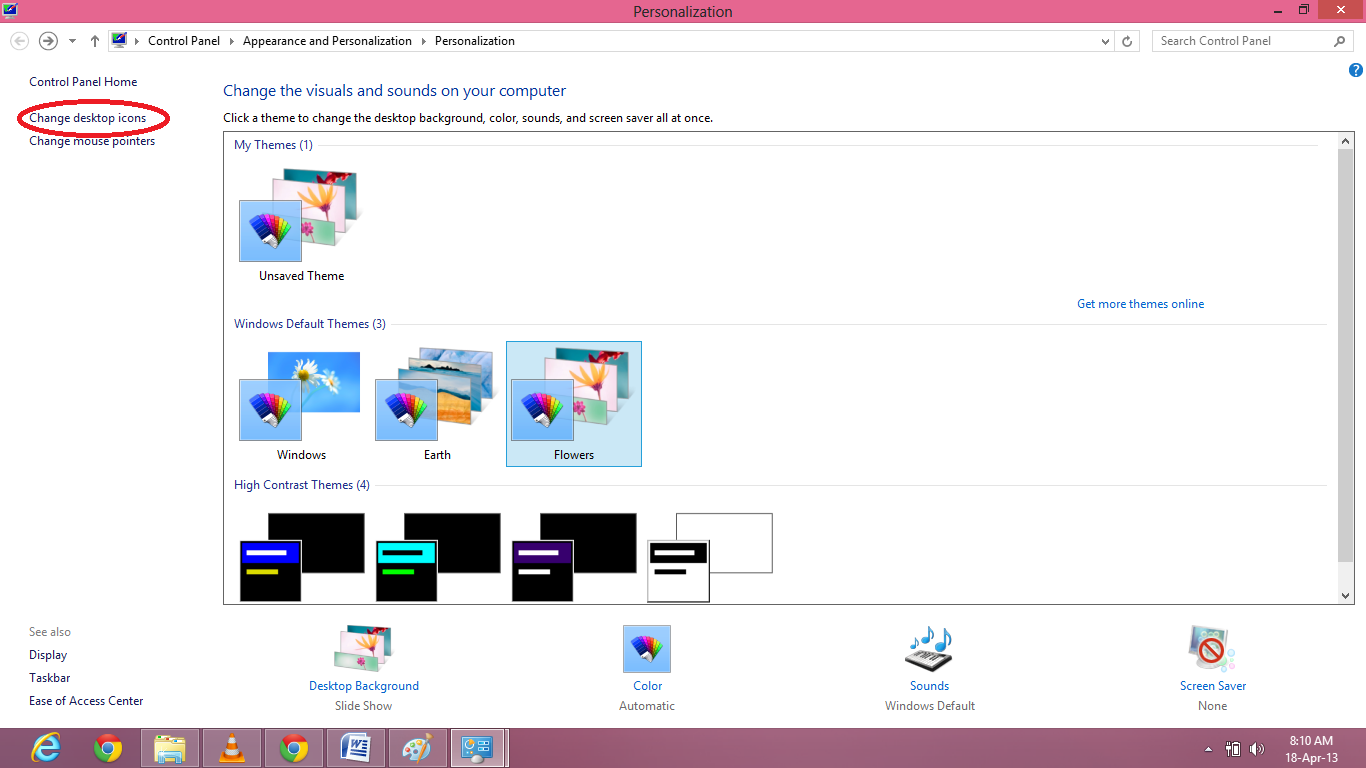 Now click on CHANGE DESKTOP ICON.
Add your desired icon on your desktop.
Click on MY COMPUTER icon from your desktop. Go to SYSTEM PROPERTIES. Click on windows Activation. Enter the key that you have purchased. Your window is activated. Enjoy!
How Can We do Defragmentation in Windows 8 For Free/ Windows 7 free Fragmentation./ Make your PC fast
Defragemtation is a necessary way to make your PC fast. Today we are going to Defragmentation in windows 8. For defragmentation you have to follow following steps,
1) RIGHT CLICK on your start menu.

2) CLICK on the control Panel. your view will be similar to following Image.

1) RIGHT CLICK on your start menu.

2) CLICK on the control Panel. your view will be similar to following Image.

3) CLICK on SYSTEM and SECURITY option in top left.
4) On the next menu go ADMINISTRATIVE TOOLS in second lat option. In the sub menu there is option of defragment and optimize you drives click it. First analyze and then optimize.